Pc
 Steam
 Antivirus
 Germany(Deutsch)
 United States(English)
 United Kingdom(English)
 France(Français)
 Spain(Español)
 Italy(Italiano)
 Czech(česká republika)
 Poland(Polski)
 Japan(日本語)
 Korea(한국어)
 Taiwan(繁體中文)
 Portugal(Português)
 Brazil(Português)
 Australia(English)
 Canada(English)

ApowerREC 1 Month
16.00EUR
17.77EUR
-10%
Plattform:

Region:

Stichworte:
Apowersoft Software
Lager:
Auf Lager
Menge:
1-500
Produktbeschreibung
Click here to download ApowerREC
Product Overview
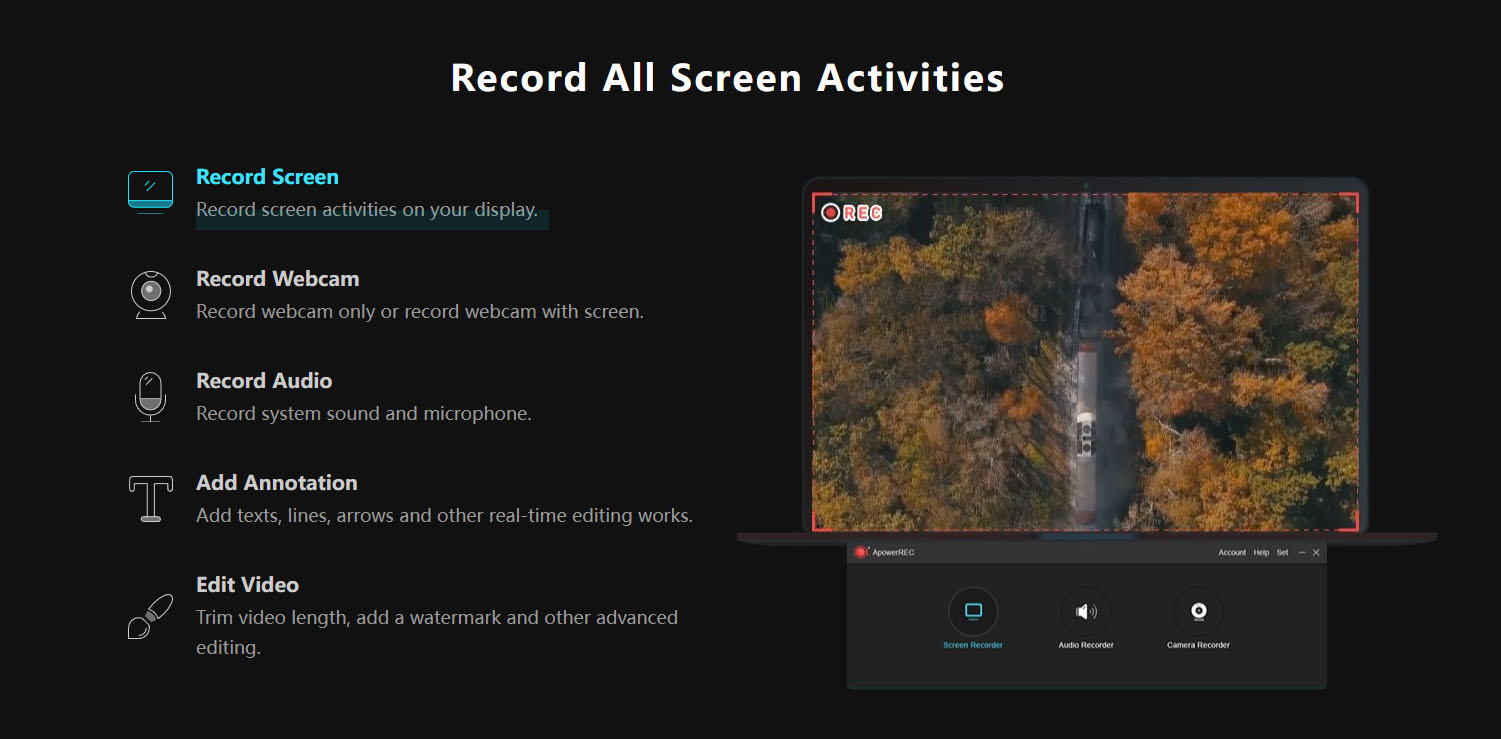
ApowerREC is a powerful and easy-to-use cross-platform screen recording software that enables you to record everything on your screen with high quality. It works seamlessly on Windows, macOS, Android, and iOS, making it a versatile solution for both personal and professional use.
Key Features
- Record all screen activities with system sound and microphone voice
- Multiple recording modes: full screen, custom region, application window, picture-in-picture
- Webcam overlay support for tutorials and presentations
- Built-in video and audio editing tools for annotations, highlights, and effects
- Format conversion to MP4, AVI, WMV, MOV, FLV, and more
- Scheduled recording and follow-recording tasks
- One-click screenshot capture with auto-save
- High-quality audio capture with adjustable system and mic volume
- Instant sharing to YouTube, Google Drive, and Dropbox
Marketing Messages & Use Cases
- For professionals: Record online meetings, webinars, product demos, and training sessions with synchronized audio and video.
- For educators: Create engaging tutorials, lectures, and e-learning materials with annotations and webcam overlay.
- For content creators: Capture high-quality gameplay, software demos, and presentations for social platforms.
- For general users: Record daily screen activities, app walkthroughs, and share useful tips with ease.
2) Unique selling point
- Cross-platform compatibility: Works on Windows, macOS, Android, and iOS.
- Flexible recording modes: Choose full screen, region, or application window recording.
- Webcam + Screen recording: Capture picture-in-picture videos for tutorials and live commentary.
- All-in-one solution: Record, edit, annotate, and convert within one software—no need for extra tools.
- Automated recording: Set timers or follow app-specific tasks for unattended screen capture.
- Multi-format export: Save recordings in various formats for different platforms.
- Seamless sharing: Upload and share recordings directly to popular platforms.
- High-quality audio: Capture both system audio and microphone clearly.
3) Other Strength
Main Alternatives & Differences
- OBS Studio – Free, powerful, customizable, suitable for advanced users and live streaming. Steep learning curve.
- Camtasia – Professional tool combining recording and advanced editing. Comprehensive but more expensive.
- Snagit – Focused on screen capture with light recording features. Best for static content and quick tutorials.
- Icecream Screen Recorder – User-friendly, affordable, offers basic recording and editing features.
- ShareX – Free and open-source, rich customization options, but less intuitive for beginners.
- Movavi Screen Recorder – Balanced between simplicity and features; affordable with essential editing tools.
- Loom – Cloud-based, easy for quick video messages, team communication, and lightweight tutorials.
- FlashBack Express – Beginner-friendly, reliable screen recorder with simple editing options.
Competitive Advantage of ApowerREC
- More intuitive than OBS and ShareX.
- Less expensive than Camtasia while still offering strong editing tools.
- More versatile than Snagit or Loom with support for long recordings, multiple formats, and advanced features.
- Broader cross-platform support than many desktop-only tools.